When people say “install Java,” they often really mean “install a JDK.” The JDK contains the Java language toolchain, the runtime pieces needed to execute Java code, and a wide set of developer utilities for compilation, packaging, documentation, dependency analysis, monitoring, debugging, and distribution. It is also the most practical layer for long-term roadmap planning because future LTS adoption usually crystallizes around JDK upgrade windows.
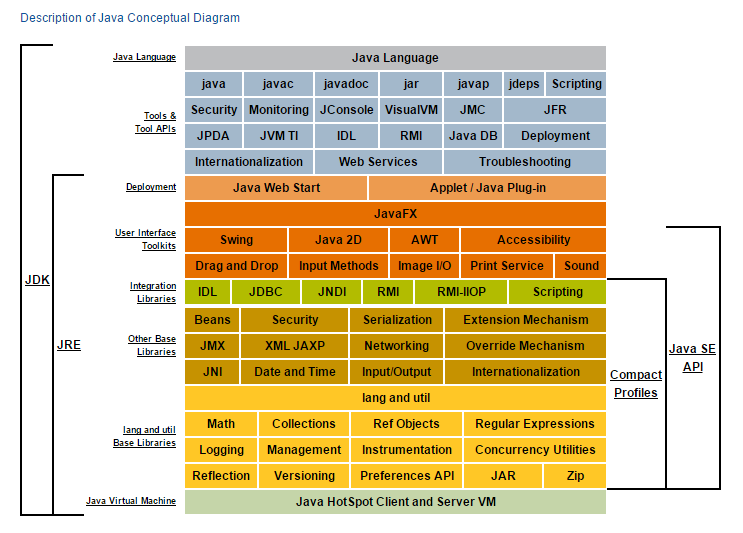
The execution engine. It loads class files, verifies bytecode, links classes, manages memory, performs garbage collection, interprets or JIT-compiles hot code, and interacts with the host OS.
The runtime environment. Historically this meant the JVM plus the standard libraries and supporting runtime files needed to run Java applications. In modern Java, this idea still exists conceptually, but it is often realized through modular runtime images rather than a separate public JRE bundle.
The development kit. It includes the runtime capabilities and adds compiler, launcher, documentation tools, bytecode analyzers, packaging utilities, debuggers, monitors, module tools, and more.
You create .java files using language features such as classes, interfaces, records, enums, generics, annotations, lambdas, and modules.
The compiler checks syntax and types, resolves symbols, runs annotation processors when configured, and emits JVM bytecode as .class files.
You may bundle classes/resources into JARs with jar, inspect dependencies with jdeps, inspect bytecode with javap, and generate docs with javadoc.
The launcher boots the JVM, sets classpath/module-path rules, loads the main class or module, and hands control over to the runtime for execution.
During execution you can monitor memory, threads, GC, and CPU behavior using tools such as jcmd, jconsole, JFR, and JMC.
Modern teams may ship a JAR, WAR, container image, or a trimmed runtime image via jlink and desktop packaging via jpackage.
The source-level part of Java that developers directly write and reason about.
The machinery that turns bytecode into running application behavior.
Libraries developers rely on before adding third-party frameworks.
Utilities that help shape a runnable artifact for real environments.
Capabilities that help you understand running systems, not just write them.
Some were bundled, some moved out, and some were retired—but they shaped the platform story.
| Aspect | JVM | JRE | JDK |
|---|---|---|---|
| Primary responsibility | Execute bytecode safely and efficiently. | Provide a runnable Java environment. | Provide a complete build, run, inspect, and package environment. |
| Contains | Class loading, verification, JIT, GC, memory/runtime engine. | JVM + core libraries + runtime files. | JRE/runtime capabilities + compiler + tools + docs + packaging + diagnostics. |
| Used by | Every running Java program. | Operators/end users running Java apps. | Developers, build systems, CI/CD pipelines, release engineering. |
| Key commands | java ultimately boots the JVM. | Historically runtime launchers and supporting files. | javac, jar, javadoc, jdeps, jlink, jpackage. |
| Modern reality | Still central and always present. | Conceptually important, often represented through modular runtimes instead of a separately marketed package. | The standard installation choice for serious Java development and most modern deployments. |
Monolithic distributions were common. Public JRE installs, browser plug-ins, desktop UI stacks, and enterprise EAR/WAR deployments were all more visible in the mainstream story.
JPMS introduced strong modular structure. The platform shifted toward smaller, custom runtime images and clearer separation of what belongs in the base platform.
Java 11, 17, 21, and now 25 became practical anchors for enterprise teams. The next visible line already points toward 29, 33, 37, and 41, while tooling, container awareness, diagnostics, and cloud deployment patterns become even more central.
The JDK increasingly emphasizes observability, productivity, smaller runtimes, strong release cadence, and features such as virtual threads, pattern matching, and safer/native interop work.
Usually a full JDK from OpenJDK, Temurin, Oracle JDK, or another vendor distribution—paired with Maven or Gradle and an IDE such as IntelliJ IDEA, Eclipse, or VS Code.
A build agent with one or more JDKs installed, test tools, code coverage, static analysis, dependency resolution, and packaging steps that emit deployable artifacts.
Often a smaller runtime footprint: a container image with a vendor JDK/JRE equivalent, or a custom runtime image produced by jlink.
No. It includes compilation, but it also includes launchers, documentation tools, monitoring tools, module tooling, packaging tooling, and runtime capabilities.
Yes. A JDK can run Java applications because it includes runtime capabilities; it is not “compile-only.”
No. Components have been added, modularized, deprecated, removed, or moved out over time. That is why historical diagrams are useful but should be interpreted as snapshots, not eternal truths.
No. Frameworks such as Spring, Hibernate, Netty, Jakarta EE implementations, and testing libraries are ecosystem layers on top of the JDK.
asset/CBNux.png. This page is a JavaOmnibus explainer view intended to make the JDK/JRE/JVM relationship easier to understand in one place.